Business Not Showing on Google Maps in Ahmedabad? 7 Fixes
Can't find your business on Google Maps in Ahmedabad? Work through seven common causes, from verification and inconsistent business information to duplicate or suspended profiles.
If your business is not showing on Google Maps in Ahmedabad, first test your visibility like a customer. Then check verification, business information, categories, reviews, service-area setup, duplicate listings, and any suspension or suppression before changing everything at once.
This is one of the most common frustrations I hear from small business owners in Ahmedabad — they know their business is on Google Business Profile, they search for their own shop name or category, and either nothing shows up, a competitor three streets away shows up first, or worse, a completely different business appears in their spot. It feels random, but it almost never is. There's usually a specific, identifiable reason.
I'm Hitesh Jaganiya, a digital marketing consultant with 11 years of experience, certified in Google Ads and Google Analytics. Local visibility issues like this come up constantly in my work, and most of the time the fix is more straightforward than people expect — it just requires knowing where to actually look. Here's how I'd work through this problem systematically.
First, Understand What You're Actually Testing
Before troubleshooting anything, it matters how you're checking. Searching for your own business name while logged into your own Google account, on a device that's regularly near your shop's location, gives Google every possible hint that it's you searching for yourself — which can make your listing appear even if it wouldn't for a genuine customer.
The more honest test is searching from an incognito browser window, ideally for a category term rather than your business name — "bakery near me" instead of your bakery's actual name, or "digital marketing consultant Ahmedabad" rather than searching your own brand. If you can, ask someone in a different part of the city (or use a VPN set to a different Ahmedabad location) to search the same term and tell you what they see. This tells you what a genuine potential customer actually experiences, which is the only test that really matters.
Reason 1: Your Profile Isn't Actually Verified
This sounds basic, but it's genuinely one of the most common causes. An unverified Google Business Profile can sometimes appear in a very limited capacity, or not at all, particularly for competitive local searches. Verification (usually by postcard, phone, or email, depending on your business category) confirms to Google that a real business exists at that location, and it's a prerequisite for full visibility, not an optional extra step.
Check this in your Google Business Profile dashboard — it will clearly show if verification is pending, incomplete, or was somehow reversed (which can happen if Google flags something as suspicious, even mistakenly).
Reason 2: Inconsistent Business Information Across the Web
Google cross-references your business name, address, and phone number (often called NAP — Name, Address, Phone) against how it appears elsewhere online — your website, other directories like JustDial or Sulekha, social media pages, and old listings that might still be floating around from years ago. If your address is written slightly differently in different places — "SG Highway" in one, "Sarkhej-Gandhinagar Highway" in another, a shifted suite number, or an old address you moved away from a year ago but never updated everywhere — Google can lose confidence in which information is actually correct, which hurts how confidently it shows your listing.
This is worth checking directly: search your business name plus city, and see what address and phone number show up across the first two pages of results. If you find inconsistencies, correcting them everywhere you can find them is one of the more tedious but genuinely effective fixes available.
If you are also working on your website's organic visibility, my guide to SEO for real estate businesses in Ahmedabad explains how local relevance, location signals and trust fit together for businesses serving specific areas.
Reason 3: Category Selection Doesn't Match What People Actually Search
Choosing the right primary category matters more than most business owners realize. If you run a business that could reasonably fall under two or three category options, and you've picked one that's too broad or slightly off from how people actually search, you're competing in the wrong pool entirely. A "marketing agency" categorized simply as "Consultant" instead of "Marketing Agency" or "Advertising Agency" is going to miss a meaningful share of relevant local search visibility, even with a perfectly optimized profile otherwise.
It's worth revisiting your primary and secondary category selections periodically — Google adds and refines categories over time, and a category that didn't exist when you first set up your profile might now describe your business far more precisely.
A useful way to check this: search a few of the terms you'd expect your ideal customer to use, and look at what categories the businesses currently ranking well have chosen. If competitors ranking above you have consistently picked a category you haven't considered, that's a strong hint worth testing on your own profile.
Reason 4: Not Enough (or No Recent) Reviews
Review count and review recency both factor into local visibility, and this is one area where I see genuine neglect constantly. A profile with 8 reviews from three years ago, none since, sends a weaker trust signal than a profile with 30 reviews, several from the past month. It's not just about the star rating — consistent, recent review activity signals to Google that the business is actively operating and engaging with real customers.
If you haven't asked a customer for a review in months, that's a completely free, immediate action worth taking today — a simple, direct ask after a good interaction works far better than a generic request sent out to everyone at once.
Reason 5: Your Service Area Setup Doesn't Match Your Actual Business Model
If you're a service-based business — say, a home cleaning service, a repair technician, or a consultant like myself — that travels to customers rather than having them visit a fixed location, your Google Business Profile should generally be set up as a service-area business rather than a storefront with a public address. Getting this wrong in either direction — showing a fixed address for a business that doesn't actually receive walk-in customers, or failing to properly define your service area — can both confuse Google's understanding of who should see your listing and where.
Reason 6: Duplicate Listings Competing Against Each Other
This happens more often than people realize, especially for businesses that have moved locations, rebranded, or had multiple people create listings independently over the years (a previous employee, an old marketing vendor, or an automated business listing service). If two profiles exist for the same business, Google may split attention, reviews, and ranking signals between them, weakening both rather than consolidating strength into one authoritative listing.
Search your business name carefully — including slight name variations and old addresses — to check for duplicates. Google provides a process for reporting and merging duplicate listings once found, though it can take some time to resolve.
This is also worth checking if your business has ever changed ownership, been listed by a previous management team, or had a franchise-style setup where a corporate office accidentally created a listing alongside your local one. These situations create duplicates far more often than business owners expect, and they can sit unnoticed for years, quietly splitting the very signals that would otherwise help a single, consolidated listing rank well.
Reason 7: A Suspended or Suppressed Profile
Sometimes a profile has actually been suspended by Google, often without a particularly clear explanation, usually triggered by something that looks like a policy violation — even an accidental one, like a business name that includes marketing language ("Best Digital Marketing Ahmedabad" instead of just the actual business name), a mismatched address, or unusual account activity. If your profile has disappeared entirely rather than just ranking poorly, checking your Business Profile dashboard for any suspension notices should be the very first thing you do, before troubleshooting anything else on this list.
A Systematic Way to Work Through This
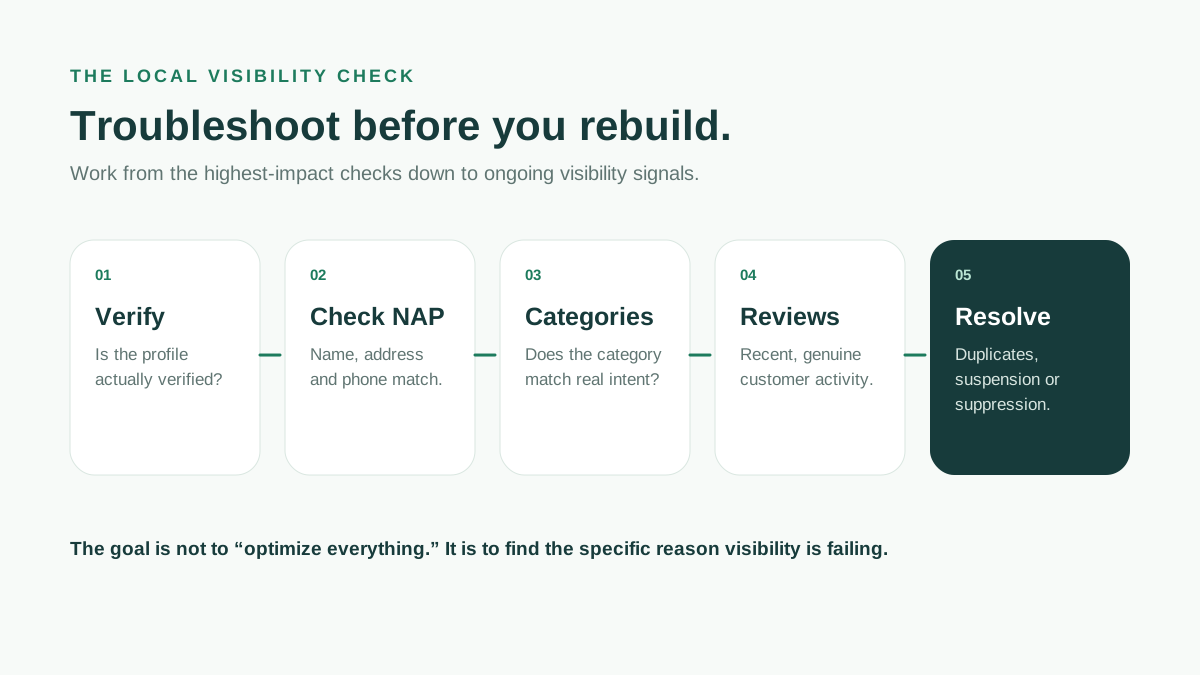
Rather than guessing which of these applies to you, I'd suggest working through them in this order: confirm verification status first, since nothing else matters if that's broken. Then check for suspension notices. After that, audit your NAP consistency and category selection, since these are the most common silent issues. Then look at review activity and duplicate listings. This order roughly reflects how severely each issue tends to affect visibility — verification and suspension can mean near-total invisibility, while category and consistency issues tend to cause partial, harder-to-notice underperformance.
What Actually Helps Once the Basics Are Fixed
Beyond troubleshooting what's broken, a few ongoing habits genuinely help local visibility over time: posting regular updates through Google Business Profile's post feature (offers, events, updates — even simple ones), uploading real photos periodically rather than leaving old or stock imagery, and responding to every review, positive or negative, since response activity itself is a visible signal of an actively managed business. None of these fix an underlying technical problem, but they compound meaningfully once the fundamentals are actually in place.
It's also worth building a habit of checking your profile every few weeks rather than only when something feels wrong. A lot of these issues — a suggested edit slipping through, a review going unanswered for too long, a slow drift in NAP consistency after updating your website but forgetting a directory listing — are much easier to catch and fix early than to untangle months later once they've compounded into a bigger visibility problem.
For a broader look at how to judge your website and search data yourself, you can also read how to read Google Analytics and Search Console without an agency. The same principle applies here: look at the evidence before changing the strategy.
Frequently Asked Questions
How long does it take for Google Maps changes to show up after fixing an issue?
It varies, but most changes reflect within a few days to two weeks. Category changes and information corrections tend to update faster than recovering from something more serious like a suspension, which can take longer and sometimes requires an appeal.
Can a competitor cause my listing to disappear?
It's rare but not impossible — false suggested edits or fraudulent flags can sometimes affect a listing. If you suspect this, check your profile's edit history in the dashboard and dispute any incorrect suggested changes directly with Google.
Should I create a new listing if my old one seems broken?
Generally no — creating a duplicate usually makes things worse, not better. It's almost always better to fix or, if necessary, formally request reinstatement of an existing listing than to start fresh with a new one.
Does having a website help my Google Maps ranking?
Yes, to a meaningful degree. A functioning, consistent website that matches your Business Profile information reinforces the trust signals Google uses, and it gives potential customers another place to confirm your business is legitimate before visiting or calling.
Is it worth paying for Google Ads if my Maps listing isn't showing organically?
It can help in the short term for immediate visibility, but it doesn't fix the underlying organic issue. I'd generally recommend fixing the root cause first — otherwise you're paying to compensate for a problem that a bit of profile cleanup could resolve for free.
One last thing
If your business is invisible on Maps, don't immediately create another listing or spend more money. Find out which signal is broken first.
Talk to Hitesh