10 Google Ads Optimization Moves Most Accounts Miss
Ten specific Google Ads optimization moves I look for when auditing an account — from weekly search-term mining and negative keywords to impression share, bidding, audiences and landing-page relevance.
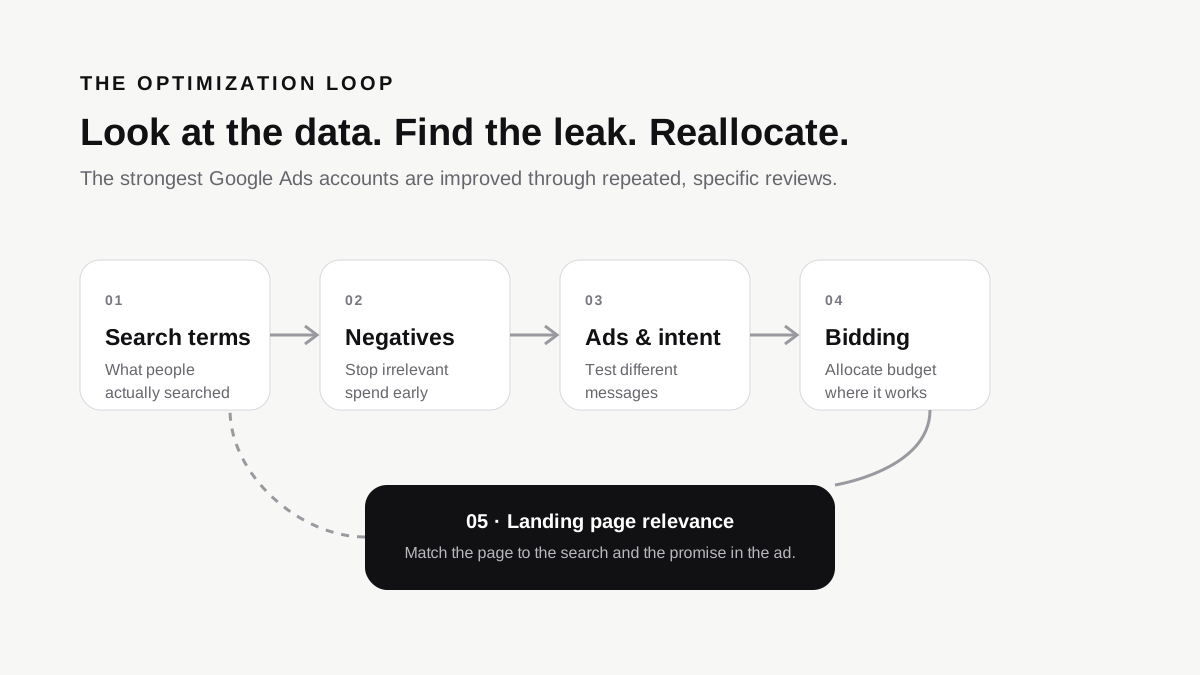
The biggest Google Ads gains often come from small, repeated account reviews: search terms, negatives, match types, ad variations, impression share, competition, audiences, conversion values, schedules, devices and landing-page relevance.
I've audited more Google Ads accounts than I can count over the last 11 years, and a pattern shows up almost every single time: the account isn't broken, it's just half-managed. Campaigns are live, budgets are being spent, and something is technically “working” — but nobody's actually gone in and done the specific, unglamorous optimization work that separates a genuinely well-run account from one that's just switched on and left alone.
I'm Hitesh Jaganiya, a digital marketing consultant certified in Google Ads and Google Analytics, and this isn't a list of beginner tips you've already read a hundred times. These are the specific moves I actually look for when I open an account — the ones that quietly separate accounts run by a genuine Google Ads expert from ones that are just being kept alive.
1. Mine the Search Terms Report Weekly, Not Occasionally
This is the single most skipped optimization task in Google Ads, and it's honestly the most important one. Your keywords are what you bid on — your search terms report shows what people actually typed to trigger your ad. These are frequently very different things, especially with broad and phrase match keywords pulling in loosely related queries.
A genuine expert goes through this report weekly, adding irrelevant terms as negatives and, just as important, spotting new high-intent phrases worth turning into their own dedicated keywords or ad groups. Most accounts I audit haven't touched their negative keyword list in months, which means budget is quietly leaking into searches that were never going to convert.
2. Structure Negative Keywords in Shared Lists, Not Just Per-Campaign
Adding negatives one campaign at a time works, but it doesn't scale, and it's easy to forget to apply the same exclusion everywhere it's needed. A shared negative keyword list applied across all relevant campaigns means once you identify a genuinely irrelevant term — say, “free,” “jobs,” or “course” for a business that doesn't offer those — you block it everywhere at once instead of hoping you remember to add it campaign by campaign.
3. Audit Match Type Behavior, Especially Broad Match
Broad match has gotten significantly smarter with Google's AI-driven matching, but “smarter” doesn't mean it always understands your business the way you do. I regularly see broad match keywords pulling in traffic that's topically related but commercially useless — someone researching a topic, not someone ready to buy or inquire.
The fix isn't necessarily avoiding broad match entirely — it can perform very well when paired with strong negative keyword hygiene and solid conversion data feeding the algorithm. But running broad match blindly, without regularly checking what it's actually matching to, is one of the fastest ways to burn budget without realizing it.
A practical habit here: whenever you add a new broad match keyword, check back on its search terms after the first week or two of meaningful volume, not months later. Catching a mismatch early costs you far less than discovering it after a quarter of steadily leaking spend into searches that were never going to convert.
4. Test Multiple RSAs Per Ad Group, Not Just One
Responsive Search Ads let you input multiple headlines and descriptions, and Google mixes and matches them. The mistake I see constantly is running just one RSA per ad group and assuming that's enough “testing” because RSAs are inherently flexible. It isn't — you're still only testing one set of assets against itself.
Running two or three RSAs per ad group, with genuinely different angles — one benefit-led, one urgency-led, one social-proof-led, for example — gives you comparative data on what messaging actually resonates, rather than just letting one ad's internal combinations optimize in isolation.
5. Check Search Impression Share Lost to Budget vs. Rank Separately
This metric gets ignored constantly, and it tells you something crucial: is your budget too small, or is your ad quality or bid too weak? Google splits this into two separate numbers — impression share lost due to budget, and impression share lost due to rank. If it's mostly budget-related, you know more spend could capture more of the available demand. If it's mostly rank-related, throwing more budget at it won't help until you fix Quality Score, bidding strategy, or ad relevance first. Treating both as the same problem is a common, costly mistake.
6. Review Auction Insights to Understand Real Competition
Auction Insights shows you who else is bidding on the same auctions you are, how often you outrank them, and how often your ads show up together. This is one of the most underused reports in the platform. It tells you whether a new, aggressive competitor has entered your space, whether an established one has pulled back, and whether your visibility is genuinely shrinking or just fluctuating normally.
It's particularly useful for explaining sudden performance shifts that otherwise look mysterious. A cost-per-click that suddenly climbs, or a conversion rate that quietly drops, can have a simple explanation sitting in this report — a new competitor bidding aggressively, or an existing one significantly increasing their overlap rate with you. Without checking it, that kind of shift can easily get misattributed to something wrong with your own account when it's actually an external market change.
7. Layer Audience Signals Without Restricting Reach Unnecessarily
For Search campaigns specifically, audiences should usually be added in “Observation” mode, not “Targeting” mode, unless you have a very specific reason to fully restrict who sees your ads. Observation mode lets you see how different audience segments perform — remarketing lists, in-market audiences, custom segments — without cutting off the broader reach that Search campaigns generally need to work well. I regularly find accounts that accidentally restricted their entire campaign to a tiny audience segment, drastically limiting reach without anyone noticing why traffic dropped.
8. Set Up Value-Based Bidding Correctly, Not Just Turn It On
Smart Bidding strategies like Target ROAS or Maximize Conversion Value are powerful, but they're only as good as the conversion values feeding them. If every conversion is tracked with the same flat value regardless of what was actually purchased or how qualified the lead was, the algorithm is optimizing toward volume, not actual business value. A genuine optimization move is assigning realistic, differentiated values to different conversion types — a demo request isn't worth the same as a completed purchase — so Smart Bidding is actually chasing the outcomes that matter most to the business, not just the easiest ones to get.
9. Use Ad Scheduling and Device Performance Based on Real Data
Most accounts run 24/7 with no day-parting or device adjustments at all, simply because it's the default. But conversion data can show patterns — certain hours or days converting better, certain devices producing lower-quality leads. Pull up the Hour of Day and Day of Week segments alongside device performance breakdowns, and adjust allocation when the data gives you a reason. It doesn't require more budget, just smarter allocation of the budget already being spent.
10. Match Landing Pages to Ad Groups, Not Just the Whole Campaign
This one isn't strictly inside the Google Ads interface, but it directly affects Quality Score and conversion rate, so it belongs on this list. Sending every ad group in a campaign to the same generic landing page, regardless of what specific keyword or intent triggered the click, weakens both relevance and conversion likelihood.
A genuinely optimized account maps tighter ad groups to landing pages that speak directly to what that specific search was about — matching message-to-page as closely as message-to-ad. This single change can move Quality Score and conversion rate more than a bidding adjustment when the existing landing page is generic or mismatched.
Why These Optimizations Get Skipped So Often
None of these ten things are secret or advanced in a technical sense — they're all sitting right there in the Google Ads interface for anyone to use. What actually separates accounts where these are applied from accounts where they aren't usually comes down to time and attention, not knowledge. Managing an account properly means going back into it regularly and actually looking, not just checking that campaigns are still running and spending roughly on budget.
If you're managing your own account, I'd suggest picking two or three of these to focus on this month rather than trying to overhaul everything at once — the search terms report and impression share lost breakdown are usually the highest-leverage places to start, since they directly reveal wasted spend and missed opportunity in a way that's easy to act on immediately.
If you're deciding whether Google should be your first paid channel, my guide on Google Ads vs Meta Ads for Ahmedabad businesses explains how customer intent, product type and budget change that decision.
Frequently Asked Questions
How often should I check my Google Ads search terms report?
Weekly is a reasonable minimum for most active accounts. Waiting monthly or longer typically means irrelevant spend accumulates for weeks before it's caught and corrected.
Is broad match keyword targeting bad for Google Ads campaigns?
Not inherently. Broad match can perform well, but it needs strong negative keyword management and solid conversion tracking data to avoid wasting budget on loosely related searches.
What's the difference between impression share lost to budget and rank?
Lost to budget means your daily budget is limiting eligible impressions. Lost to rank means your ad quality or bid isn't competitive enough. They require different fixes.
Should I use audience targeting or observation mode for Search campaigns?
Observation mode is generally safer for most Search campaigns because it lets you collect audience performance data without restricting overall reach. Targeting should be deliberate.
Do I need a Google Ads expert to implement these?
Many of these tasks are learnable by a business owner. The real constraint for many founders is time and consistency — exactly why these optimizations get skipped even when the knowledge is available.
Keep going
Good Google Ads optimization starts with knowing what the account is actually telling you.
If you want to connect campaign data with wider website performance, read How to Read Google Analytics and Search Console Yourself.